In the mid-2000s I had an extended contract with a client whose sales team used screenshots to make lookbooks they could share with customers to demonstrate the company’s capabilities. Tasked with finding a way to organize and catalog these images for convenient retrieval, I set about researching available methods.
At the time, I wasn’t familiar with content management systems (CMS), and I quickly learned that there were plenty of available solutions, most of which asked exorbitant fees and didn’t necessarily have a clear use case for us. I started toying around with Joomla, WordPress, and some other related platforms.
To really get going, I started blogging on my own time and launched a satirical blog called JankyVision, later rebranded as The Post News Times. It was at first my humble attempt at emulating The Onion, but provided a solid means for practicing web design, writing, editing, publishing, coding, graphic design, media management (the relevant bit here), and content creation.
Although WordPress was versatile, the direct application of CMS to our situation exceeded my capabilities at the time, so I devised two other means of managing the image library.
Office 2007 Clipart Library
The first was using the built-in Office Clip Art library in PowerPoint. At the time, this was a sidebar that could be populated with user images, so a naming convention would allow everyone on the network to save images to a central location, and pull them up directly in their presentations to drag them onto the page. It worked, but required more individual workstation tinkering and compliance than teams were willing to do in full.
Proper function of the clipart library required modifying each workstation’s Office installation to point to the shared network directory.
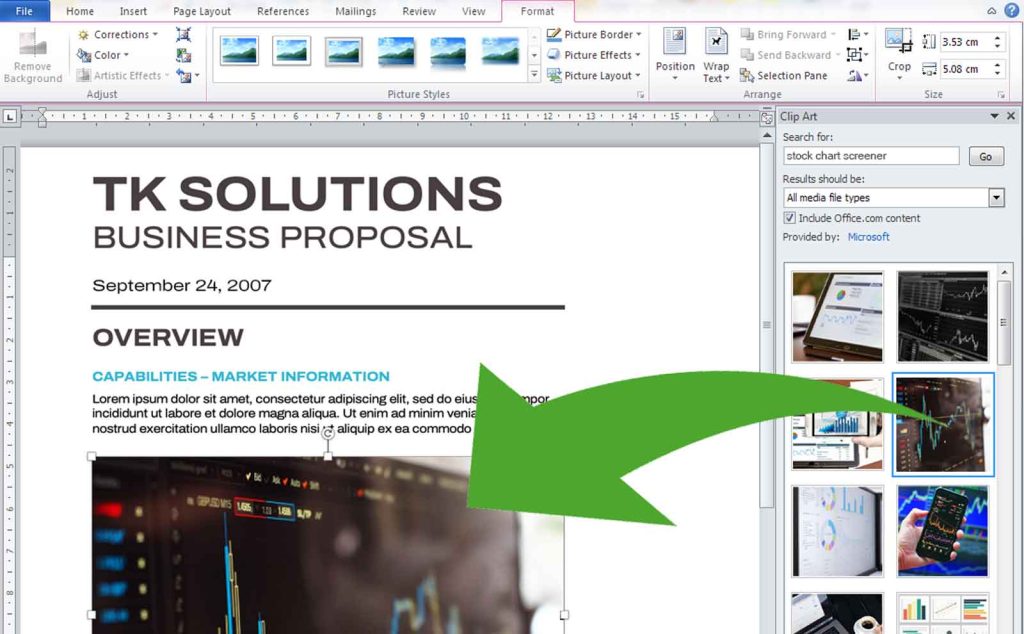
End users saving images to this library with the agreed-upon naming convention. For example, if the format was keywords with spaces and not dashes or underscores, the following identical files might not show up in the same search results:
- “stock screener screenshot acme mobile.jpg”
- “StockScreener_Scrshot-acme-mob.jpg”
Office appears to no longer have the capability for maintaining an image library accessible through a clipart panel. Even so, it’s easy enough for editors to insert images with the Insert Picture > From Photo Browser or > From File…, but the internal clipart library sped up the process and put all the images in a rapidly searchable, previewable window right beside the document.
Google Picasa
Fortunately, around the same time Google released Picasa, a magical image manager for its time. It’s intended for individual users to catalog images on their own drives, but I discovered that you could point it to a library on a network drive. This would allow the same functionality as the MS Office one, but with no additional fiddling around for installation.
Picasa would automatically catalog all images in the named directory, and everyone accessing it could find the files effortlessly by name.
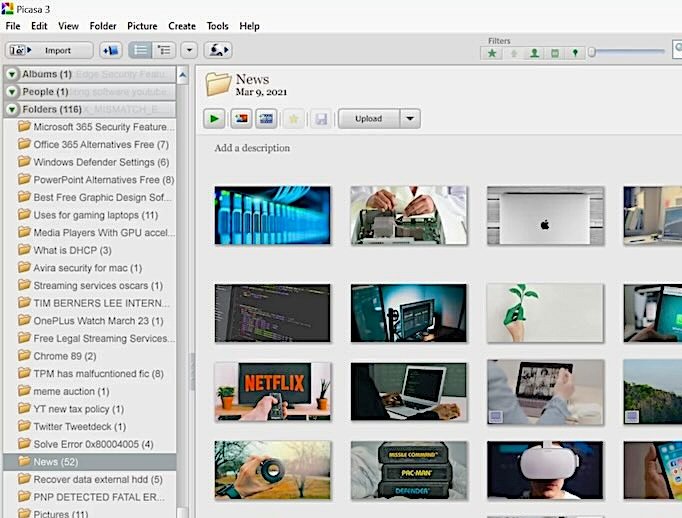
However, this also required a strict naming convention using spaces and not dashes, and for users to locate images they had to be named correctly. This proved to be impractical for one of the same reasons as the clipart library: inconsistency in naming of files. Any misnamed files were simply lost to searchers. Anyone working with teams knows there is always some resistance or innocent noncompliance with conventions, so without considerable effort to enforce rules, these methods ultimately had little chance of long-term success.
This was even more true when Google discontinued Picasa in 2015. Google Photos (Picasa’s successor) might have a similar function, but it’s not immediately clear from a cursory reading of its product page.
I was bummed, because I had just created two viable custom CMS tools from scratch, and due to fragmented implementation they were abandoned.
Nevertheless
Such efforts are never wasted. Even though the original objective was achieved twice and not adopted, the techniques and principles involved provided helpful knowledge for future use, as well as vital clarity in defining the company’s actual needs.
As always with technology, no matter what had happened with the libraries, something eventually comes along to make them obsolete. The way we capture, store, and organize images has been in constant flux. Solutions like Adobe Bridge, although at a premium price point, does much of what these ad-hoc methods attempted. It’s not accessible from Office, though, and not cost-effective to expand to team members who don’t use other Adobe products.
The main takeaway for me was that many applications have off-label uses beyond their stated and intended purpose. Insights like these can help guide future development and project planning. They also contribute heavily to the perennial question “Why would you want to do that?“